In short: A WordPress alternative pays off for businesses whose website has become slow, maintenance-heavy or hard to extend. For classic company websites, booking sites and shops with their own processes, a visual website builder such as Webstudio, combined with a lean custom backend where needed, is usually the better choice. Editorial teams with many authors are also faster and safer with Webstudio and a headless CMS such as Directus. At ELECOS, switching costs about the same as a new website: from €2,000 for a one-page site and from €5,000 for a website with several pages.
According to W3Techs, WordPress runs 40.2% of all websites worldwide (as of 29 September 2026). That does not automatically make it the right choice for your business. Many of the WordPress sites we take over follow the same pattern: a page builder such as Elementor, Bricks or WPBakery, 20 to 30 plugins, regular security warnings and a site that loads noticeably slowly on a smartphone.
In this article you will learn when switching pays off, which alternatives exist, how fast websites really are after a move (with measurements from our projects) and what the switch costs.
What is a WordPress alternative?
A WordPress alternative is any system that lets you build and maintain a website without having to run WordPress, a theme and plugins. This includes visual website builders (Webstudio, Webflow), DIY site builders (Wix, Jimdo), shop systems (Shopify) and headless CMSs (Payload, Directus), where content and presentation are kept separate.
What matters is not the tool itself, but what it takes off your hands: servers, updates, security and loading time.
Why WordPress becomes a problem for many businesses
WordPress was built as a blogging system. A modern company website on WordPress is usually assembled from many separate parts: a theme, a page builder and plugins for SEO, forms, cookies, caching, security, multilingual content and the shop.
This is how a single page request differs:
Classic WordPress
The page is built on every request
- 1Visitor requests the page
- 2Web server starts PHPon a hosting server, often in a single data centre
- 3Database queriescontent, settings, menus
- 4Theme, page builder and plugins loadElementorWooCommerceSEOCacheSecurityCookieForms+15
- 5HTML with lots of scripts goes to the browser
Many moving partsupdates · risk
Webstudio
A lean page comes from the network edge
- 1Visitor requests the page
- 2Nearby edge serverglobal Cloudflare network, no server of your own
- 3Lean HTML and CSSno plugins, hardly any JavaScript
- +Optional via APIDirectus, onOffice, shop, booking · server-side and cached
Few moving partsfast · low maintenance
Simplified illustration. Caching plugins shorten the WordPress path, but they are no substitute for a lean architecture.elecos.de
Each of these parts has its own developer, its own updates and its own security holes. This leads to four typical problems:
- Loading time: On every request, the server rebuilds the page from the database, theme and plugins and sends a lot of JavaScript along with it. That takes time, especially on mobile.
- Maintenance: Plugins need constant updates. An update can break the layout or the shop, and a skipped update opens security holes.
- Dependency: Whenever a feature is needed, another plugin gets installed. After a few years, nobody knows exactly what holds the site together.
- Security risk from third-party code: Every plugin is code from another company with full access to your website. Plugins can be sold, and the new owner can ship a backdoor with the next update.
Two cases from 2026 show that this is not a theoretical risk: in April, WordPress.org closed 31 plugins after a buyer had taken over the entire plugin portfolio via an online marketplace and built in a backdoor that went unnoticed for eight months (Blue Headline). In June, manipulated pro plugins that stole login credentials were distributed through the official update channel of the vendor ShapedPlugin (The Hacker News, CVE-2026-10735).
When a switch can wait
We no longer build new websites with WordPress, not even for editorial teams with many authors. Even so, a move does not have to happen right away. If your site loads quickly, is maintained regularly and no major changes are planned for the coming months, we plan the switch sensibly together with your next redesign. That reflects our principle of "strategy before investment".
- 1
Do several editors publish posts every day?Magazine, news portal, large blog with roles and approvals
If yesWebstudio + a headless CMS such as Directus
- No ↓
- 2
Is the site slow or maintenance-heavy?Constant plugin updates, security warnings, poor PageSpeed scores
If yesSwitching usually pays off
- No ↓
- 3
Do you need integrations or custom processes?CRM, onOffice, bookings, shop backend, connections to your software
If yesWebstudio + a custom backend
- No ↓
- 4
Is a new design due anyway?Rebranding, dated look, new services or target groups
If yesPlan the redesign without WordPress straight away
- No ↓
Everything running smoothly? Then leave it as it is for now.Strategy before investment
Rule of thumb from 19 projects in the ELECOS portfolio.elecos.de
The main WordPress alternatives compared
| System | Suited to | Hosting and maintenance | Speed | Data protection |
|---|---|---|---|---|
| Webstudio | Company websites, booking sites, shops with a custom backend | No server of your own, no plugin updates | Very high | Open source (AGPL), delivered via Cloudflare, local fonts possible |
| Webflow | Marketing websites, landing pages | No server of your own | High | US provider, data processing agreement required |
| Wix, Jimdo | Small DIY sites | No server of your own | Medium | Depends on the provider, little control |
| Shopify | Standard online shops | No server of your own | High | US provider, monthly fees and apps |
| Webstudio + headless CMS (Directus, Payload) | Editorial teams with many authors, portals, platforms | CMS in the cloud or on your own server | Very high | Full control, hosting in Germany possible |
| WordPress | Existing sites only, no longer recommended for new builds | Own server, ongoing plugin updates | Depends on plugins | Depends on plugins and hosting |
Our recommendation: Webstudio for the website. If many people maintain content, add a headless CMS such as Directus. If you need special features, we build them directly in Webstudio or as a dedicated Cloudflare Worker instead of installing a third-party plugin.
What if several editors maintain content?
For that, we combine Webstudio with a headless CMS such as Directus. A headless CMS is purely a content management system without its own front end: your team writes and manages posts with roles, approvals and drafts, and Webstudio displays them. Webstudio fetches the content server-side and caches it. As a result, visitors get an instantly loaded page even with many posts, without extra scripts loading in the browser.
Features without plugins: your own solutions instead of third-party code
What a plugin does in WordPress, we solve natively in Webstudio or with a small custom application on Cloudflare Workers, that is, program code running on Cloudflare's global network. Examples from our projects:
- Cookie consent: our own free consent manager Native CMP instead of a cookie plugin
- Online shop: a custom shop backend with Stripe payments for AIRsteril instead of WooCommerce
- Real estate: the onOffice integration for Goslar | Rodriguez instead of an estate agent plugin
The code belongs to you, nobody can sell it, and there are no third-party updates that change your website.
How fast are websites after the switch?
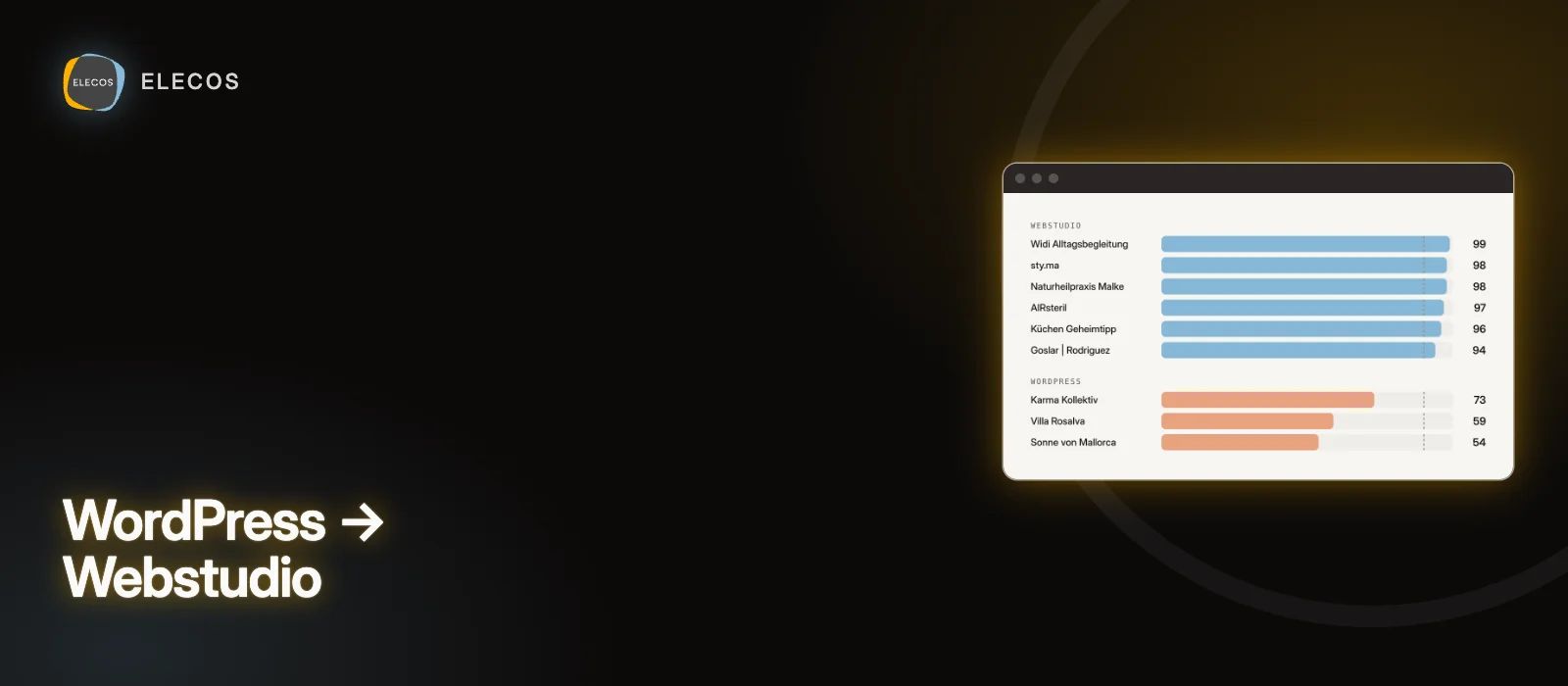
On 29 September 2026, we measured the home pages of a selection of our Webstudio projects and the WordPress websites in our portfolio with Google PageSpeed Insights. The performance score ranges from 0 to 100; from 90, Google rates a page as fast. Lab scores vary by a few points from one test to the next, and the chart shows typical results.
93–99Selected Webstudio projects, mobile
54–73WordPress websites from our portfolio, mobile
Webstudio
- Widi Alltagsbegleitung99
- sty.ma98
- Süd-West Prüfservice98
- Naturheilpraxis Malke98
- AIRsteril97
- QuitarOlor97
- Küchen Geheimtipp96
- BTB Steuerberatung96
- elecos.de96
- Ihr Maler95
- PauseSolutions95
- Goslar | Rodriguez94
- Phönix Help93
WordPress
- Karma Kollektiv73
- Villa Rosalva59
- Sonne von Mallorca54
Mobile performance score of the home page, Google PageSpeed Insights, 29 Sept 2026. From 90, a page counts as fast (dashed line).elecos.de
All the Webstudio projects shown score 93 or more on smartphones. The WordPress websites range from 54 to 73.
What the numbers show: Webstudio websites load without plugin scripts and are therefore significantly faster. This also applies to online shops such as sty.ma and AIRsteril and to sites with integrations such as Goslar | Rodriguez. Still, a Webstudio site is only as fast as its content: large images and videos cost points here too.
And what about WooCommerce?
Online shops do not have to run on WordPress either. We completely rebuilt our own shop AIRsteril.shop in 2026 after six years on WordPress and WooCommerce: the front end in Webstudio, plus a lean custom shop backend on Cloudflare with Stripe payments, guest checkout and automatic invoices. Products, prices and delivery times are loaded live from the backend.
For standard shops with many products, Shopify can be the simpler solution. As soon as your shop needs its own processes, such as configurators, enquiry lists or special pricing logic, a custom backend is often cheaper than a growing collection of paid apps.
How much does switching from WordPress cost?
With us, a switch costs about as much as a new website, because we do not just copy the existing content but revise it:
| Scope | Price |
|---|---|
| One-page website | from €2,000 |
| Website with several pages | from €5,000 |
| Website with payments (e.g. bookings, courses) | from €7,000 |
| Online shop | from €9,000 |
| Custom backends and integrations | based on effort, small backends often included |
All prices plus VAT. After the switch, plugin licences and most maintenance work fall away. For ongoing support we offer our Satisfaction Package from €20 per month. You will find all the details in our article How much does a website cost?
How a switch works without losing rankings
- 01Initial consultation and auditWe clarify goals, budget and timeline, and record all pages, content, forms and the pages that already bring visitors and enquiries from Google.
- 02Concept and contentStructure, copy and offers are revised instead of copying everything one to one.
- 03DesignTrue to your brand, fast on smartphones and clearly leading to an enquiry.
- 04Build and integrationsPages, languages, forms and integrations such as CRM, shop or booking are built in Webstudio.
- 05CrucialRedirects and testingEvery old address points to the matching new page via a 301 redirect, i.e. a permanent redirect. This keeps rankings and links intact.
- 06Go-live and monitoringAfter the switch, we check in Google Search Console that all pages are indexed correctly, and we measure loading time and enquiries.
Example for step 05: old WordPress addresses → new pages
- /2023/06/20/post-xy
- 301 →/knowledge/post-xy
- /category/websites
- 301 →/knowledge
- /big-driving-service
- 301 →/projects/big-driving-service
301 = permanent redirect. Google transfers rankings and links to the new address.elecos.de
You can find out more about the process on our website redesign page.
Frequently asked questions
Can I take my content with me from WordPress?
Yes. Copy, images, blog posts and case studies are carried over and revised along the way. For larger amounts of data, we import the content automatically.
Will I lose my Google rankings?
Not if the switch is planned properly. What matters are 301 redirects for all old addresses and an equivalent or better content structure. Faster loading times have an additional positive effect.
Can I edit my website myself after the switch?
Yes. In Webstudio you can change text and images directly on the page. Recurring content such as projects or articles is managed in a clear content management system.
Are WordPress plugins a security risk?
Yes, especially in the long run. Plugins have full access to your website and can change owners. In 2026, several cases became public in which purchased or compromised plugins distributed backdoors through regular updates. Custom features in Webstudio or as Cloudflare Workers avoid this risk.
Is Webstudio GDPR-compliant?
Webstudio is open source and delivers websites via Cloudflare's network. We host fonts locally, manage consent with our free consent manager Native CMP and use cookieless analytics for statistics. As with any provider, a data processing agreement is part of the setup.
How long does a switch take?
A one-page website is done in a few weeks, a website with several pages usually in four to eight weeks. The most important factor is how quickly content and feedback are available.
Cosimo Kroll
Managing director of ELECOS. Has been helping businesses with websites, online shops and digital projects for more than ten years.